
On this page
What replaces the folder tree#
Most document systems keep a folder tree and add metadata on top. M‑Files removes the tree. What is left is the description: a document is saved with its kind (contract, drawing, procedure) and the fields that kind needs (customer, project, dates, owner). Where it "is" becomes the answer to a search. Everything below follows from that. This guide is about what changes for the people who use it; the metadata page explains the mechanism feature by feature.
When you save a document#
A folder tree makes you decide twice: which folder, and what to call the file. Neither decision exists here. You save, and you fill in a short card: what kind of document it is, which customer, which project. The file name stops mattering, and there is no second copy to keep in step.
Example. A supplier agreement is saved as a Contract, supplier Nordisk Stål, project Hall B extension, valid to 31 March 2027. It now appears under the supplier, under the project, in the contract list, and in a view of contracts expiring next year. Nobody made a copy.
When you need to find it again
In M‑Files you find a document by what you remember about it: the supplier's name, the project, a word in the text. Anything filled in when the document was saved can be searched on. Views work like folders that fill themselves, set up for the whole company, for a team, or by you for your own home screen. The documents stay where they are.
- Procedures due for review — A quality manager opens a view of procedures due for review this quarter. It lists every one, whoever wrote it and whichever department it belongs to.
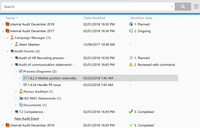
- Everything behind an audit — Open an audit and what belongs to it is listed underneath, such as its events, its process diagrams and its documents.
Access and deletion follow the document
The fields filled in when a document is saved decide more than where it turns up. Access and deletion read them too, so the rules apply themselves.
HR documents stay with HR
Access can be a rule that reads a document's fields. A document marked as HR then gets the HR rule, for example "me, my manager and HR", wherever it appears. Change what the document is and its access changes with it. No folder is left with permissions someone set in 2019 and nobody dares touch.
A draft stays with its reviewers
Access can change as a document moves through approval. A step can widen or narrow it, so a draft can stay with its author and reviewers until it is approved.
Deletion follows a date on the document
A document's fields can decide when it goes. A deletion rule reads a date: delete sensitive employee data a set period after the leaving date, for example six months. It runs automatically, and a view can show what is due. The spreadsheet of what to delete when can go.
What takes getting used to#
Moving from folders to M‑Files asks two things of a company, and only one of them is real work. People who think in folders have the easier half: views behave like folders, so the first weeks feel familiar.
The other half is deciding how your documents are described: which kinds you have, which fields each one needs, which values come from the CRM or ERP. That is the real work of an implementation, and it is worth doing with someone who has done it before.
If you are comparing systems, start here#
Filing by what a document is, with no folder tree, is the part that is hard to add afterwards, and it is why the other parts of M‑Files work the way they do. Workflows, version management, the event log and the integration with Microsoft Office matter too, and other systems have their versions of them. Start the comparison with how documents are filed, and the rest gets easier. See the platform overview for the rest of M‑Files.