
Case management
Each case has its own place in M‑Files, with its documents attached and its steps handled in a workflow.
The pressure usually comes from one area: a contract that renews before anyone reads it, or a month-end close run by email. Each solution is M‑Files set up for one such area. We adapt it to how you work and can start with a pilot.

Every document saved once and found by what it is, with the current version first.
See the solutionEvery contract with its dates and its owner, and a task to the owner before the notice date.
See the solutionA complete quality management system on M‑Files: controlled documents, training, CAPA, audits and risk in one system, with process maps to find your way.
See the solutionApproved versions, controlled changes, access by role and an exportable log, set up in M‑Files for GDPR, for ISO 9001 with VisualQMS and for your own policies.
See the solutionEvery project document under its project, with its versions and approvals, and a Microsoft Teams team for each project through CtrlTeams.
See the solutionOne file per employee, open only to HR and the manager, and deleted by rule after the leaving date.
See the solutionConnect the CRM you have, or run sales on M‑Files with customers, opportunities and their documents in one vault.
See the solutionThe month-end close as one project: the tasks in order, the right person on each, and the working papers kept beside them.
See the solutionAgreements, certificates and audit reports under each supplier, with a reminder before anything expires.
See the solution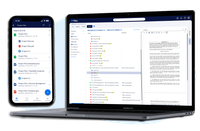
Documents are filed by what they are, such as the customer and the project they belong to, and found through views and search. Each has one version history, and the same vault opens on the desktop, on the web and on a phone.
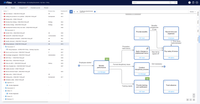
VisualQMS is a quality management system with visual business processes, built on M‑Files with process diagrams from Elements.cloud. The guiding documents and the process diagrams open side by side.

Customers and opportunities live in M‑Files, and a workflow takes each opportunity from lead to closed. The dashboard and the customer page are CtrlPortals, from our development partner CtrlDocs.
Each case has its own place in M‑Files, with its documents attached and its steps handled in a workflow.
Paper is scanned and filed in the vault like everything else, so it turns up in the same views and searches.
Approved documents are published from the vault to employees. Approval and publication run as a workflow.
Share selected documents and processes with customers and other stakeholders.
Health, safety, environment and quality documents, with review workflows and a version history.
Payroll and finance documents kept apart from the rest, open only to the people who handle them.
Audits planned, carried out and followed up to closed actions, linked to the requirements they check.
If none of these fits, M‑Files is an easy platform to build your own on.
One current version of every drawing and procedure, with the approval on record when the auditor asks for it.
See the industryA client's documents found together, open only to the people who serve them and deleted when your rules say so.
See the industryLast year's proposal, there for whoever writes this year's. Documents filed under client and engagement, and a search that reads the text.
See the industryKnow which drawing revision was issued, who approved it and when, with the project's emails kept beside it.
See the industry