
On this page
- Where the M‑Files knowledge graph comes from
- What context adds to one document
- One customer with everything linked to it
- The same question, asked of folders and of objects
- Six questions to ask of your own vault
- None of the six is solved by a better model
- From a first look to a vault AI can read
- Questions about the knowledge graph and AI
Where the M‑Files knowledge graph comes from
In a vault set up well, customers, contracts and projects are objects of their own, each document is linked to the ones it concerns, and workflows keep the details current. That is the work we do when we implement M‑Files, so we treat AI readiness as information work.
In our reading, a vault like that is what M‑Files means by its Enterprise Knowledge Graph. Its platform page calls M‑Files "context-first": the graph connects documents, data and people with metadata and relationships in place of folders and powers Aino, M‑Files' AI assistant. Its article on the AI-readiness gap sets AI on a "digital filing cabinet" against AI on connected, governed information.
What context adds to one document
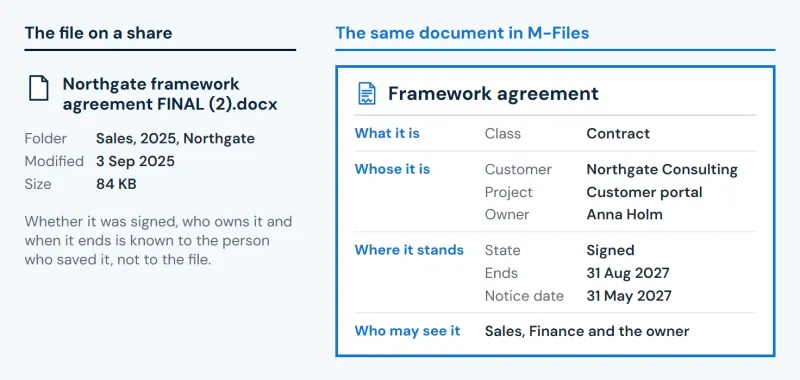
On a file share, a contract is a file name in a folder, and only whoever saved it knows whether it was signed. In M‑Files the same document carries its details: what it is, whose it is, whether it was signed and when it ends. Who may open it follows from them.
One customer with everything linked to it
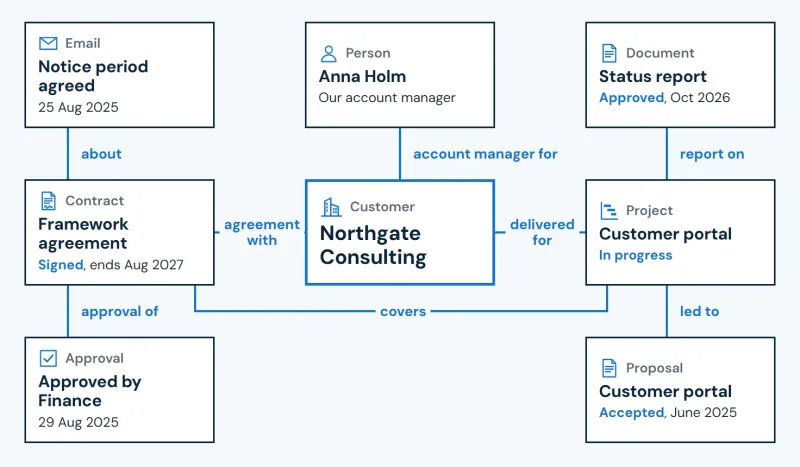
Take one customer, Northgate Consulting. The framework agreement, the project it covers, the email about the notice period, the approval and the account manager are objects in the vault, each linked to what it belongs to.
Every link is a named detail on the object it starts from, so it says what the relationship is: the agreement's customer, the email's agreement. Start from Northgate and you reach everything in one or two steps, whoever filed it, and each document is kept once. Which objects there are and how they link is the set-up decision we would spend the most care on.
The same question, asked of folders and of objects
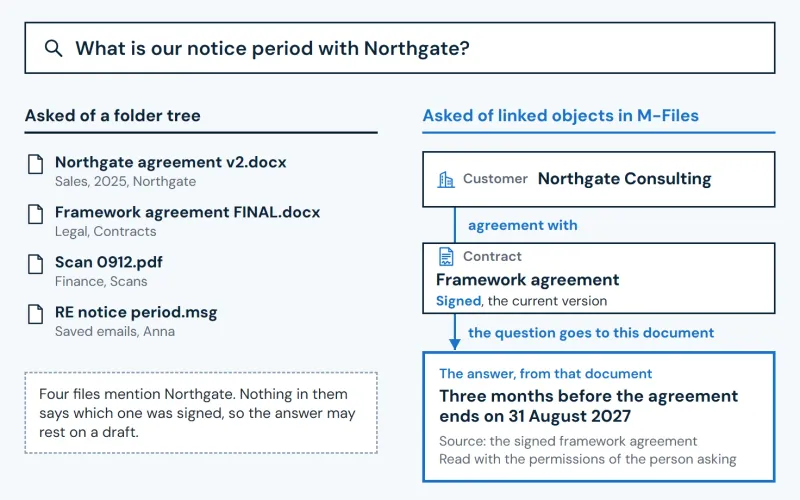
Ask an AI assistant "What is our notice period with Northgate?" over a shared drive. It finds four files that mention Northgate: two versions of the agreement, a scan and an email. Nothing in them says which one was signed, so the answer can come from a draft.
In M‑Files the question can go to one document: the agreement linked to Northgate and marked as signed in its workflow. M‑Files Aino answers from that document and lists it as the source.
Programmers have said "garbage in, garbage out" since the early days of computing, and it holds for an assistant reading a vault. We would not start with the AI. We would start with the details the AI reads.
Six questions to ask of your own vault
Each starts from one example in your vault and needs no tool, only someone who knows the work.
What is linked to the customer you know best?
List what should belong to it, such as the signed agreement and the open project, and check what is linked. In a good vault the lists match. Anything missing is left out of every answer that starts from the customer, a colleague's or an assistant's.
Which details were skipped last week?
Look at three documents saved last week. In a good vault each says what it is and whose it is, with its dates. An agreement saved without an end date is missing from any answer to "which agreements end next year?"
Which customer is in the vault twice?
Look for one customer under two names, such as Northgate Consulting and Northgate A/S. In a good vault each customer exists once, with its name taken from the CRM or ERP. Otherwise a question about Northgate is answered from only part of its documents.
Who may open an appraisal note?
In a good vault it is the employee, their manager and HR, because of what the note is, wherever someone put it. An assistant in M‑Files reads with the permissions of the person asking, so a note the whole team can open is open to the whole team's questions.
Which workflow states have stopped moving?
See which states your documents sit in, and since when. In a good vault the state moves with the work, because each step gives someone a task. Otherwise an agreement that ended last year still reads as signed, to a colleague and to an assistant.
Where is the decision behind a signed agreement?
Find the email that settled its notice period, and who approved it and when. In a good vault the email is filed with the agreement, and the approval is a workflow step with a name and a date. Otherwise an assistant can quote the clause but not say who agreed to it.
None of the six is solved by a better model
Whatever they turn up, the fix is information work: deciding what the vault holds, linking it and keeping it current. A newer model reads the same files the old one did.
A process map already says which documents each step depends on and who handles them: the list of objects and links the vault needs. We map processes with the people who do the work, so documents and processes come out of one conversation. Process management shows how we work.
From a first look to a vault AI can read
We are Solution Management, an authorised M‑Files reseller and an Elements.cloud reseller. Getting a vault ready for AI is the same work as setting M‑Files up well, including vaults we did not set up.
-
Step 1: Look at what you have
We go through the vault, or the shares that stand in for one, with the people who use it, and note what goes wrong today.
-
Step 2: Agree the objects and links
In a workshop we agree which objects the vault needs, how they link and which details each one carries.
-
Step 3: Fill in what is missing
Customers and projects can come from your CRM or ERP, and with the M‑Files Metadata Agent, metadata can be added to existing documents in bulk.
-
Step 4: Let workflows keep it current
Approval, renewal and closing become workflow steps that move the state, set access and give the next person a task.
-
Step 5: Start with one kind of document
A pilot takes one kind of document through all of this before the next one follows.